TYPO3 Backend UX – When editors suddenly become productive
Why does it take weeks to train new editors on the CMS? And why do we keep getting the same support requests? With a TYPO3 relaunch, we completely optimize the backend for user experience – with impressive results.
Backend preview instead of a guessing game
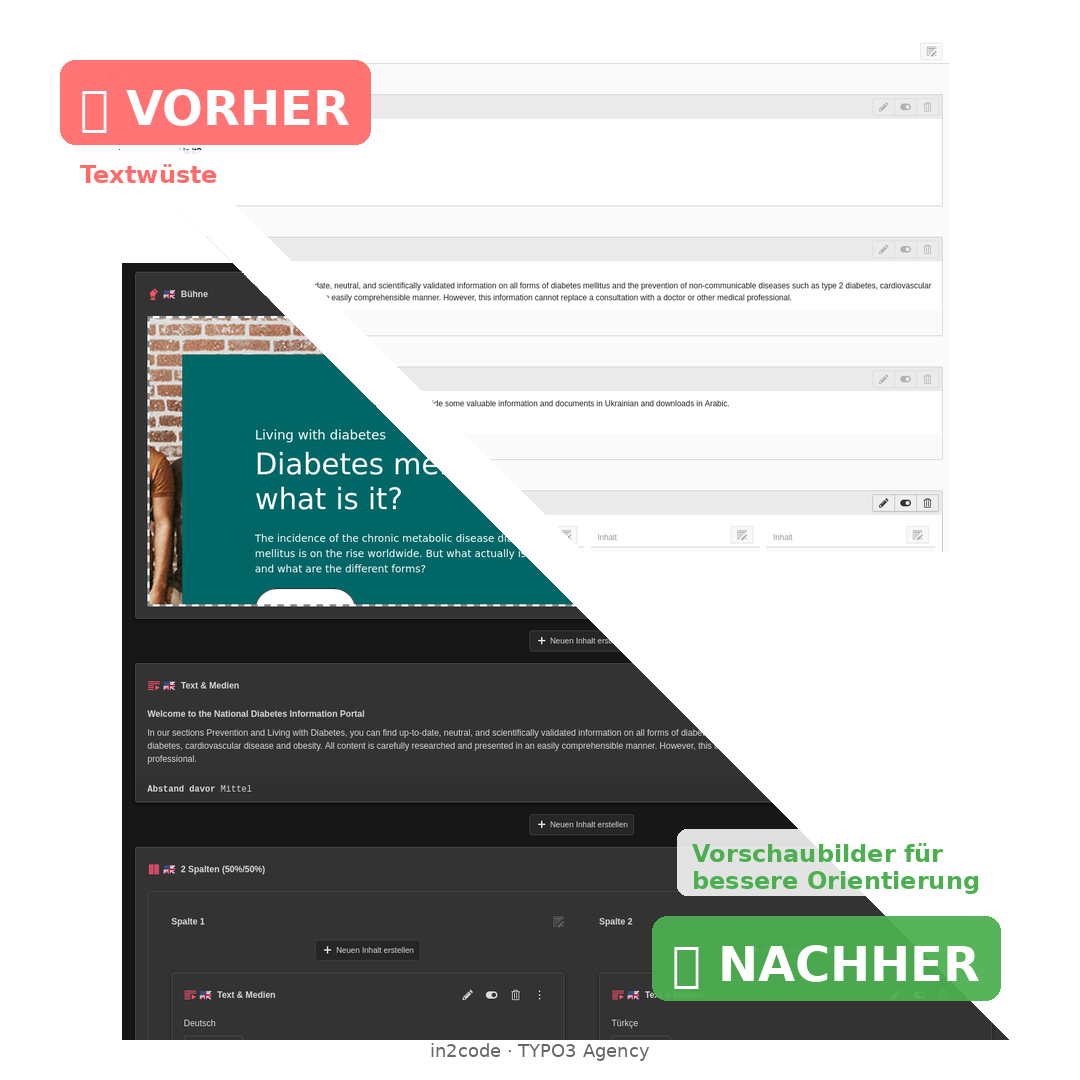
Did you know that editors switch between the backend and frontend an average of 3-5 times to check if their content looks the way they intended? This not only wastes time but also leads to frustration and errors.
"Can you show me again what this will look like?" – We heard this question far too often in our support team. With our recent projects, we asked ourselves: Why not simply show editors directly in the backend how their content will look?
The solution: A backend preview that shows in real time how the content will appear on the website. No extra clicks, no surprises after saving. What you see is what you get.
Backend preview only:
- Schnellere Content-Erstellung - Garantiert!
- Fewer errors through immediate visual feedback
- Insights into the final layout even during the editing process.
- Time savings through the elimination of switching between frontends
- Increased satisfaction among content teams
Why Backend UX for TYPO3?
Websites based on TYPO3 are extremely powerful. A high volume of page views or editors, multilingual support, and multi-tenancy are just a few of the unique selling points of this content management system. However, the price for this flexibility is often the need for custom programming.
Considering this, it quickly becomes clear: People who need to be productive work with a TYPO3 backend every day. Content teams are under pressure. Editors want to focus on content – not technical hurdles.
Therefore, it's only logical that we must optimize the user experience of the backend with every upgrade. For example, Helmholtz Munich invests not only in new features but also specifically in improving backend usability. This sustainably increases the productivity of content teams and drastically reduces training costs.
Backend UX optimization in TYPO3 using modern best practices

With a TYPO3 relaunch, we bring UX optimization directly to the backend. We want editors to be able to work playfully and intuitively – without technical expertise or hours of training.
How the optimizations work
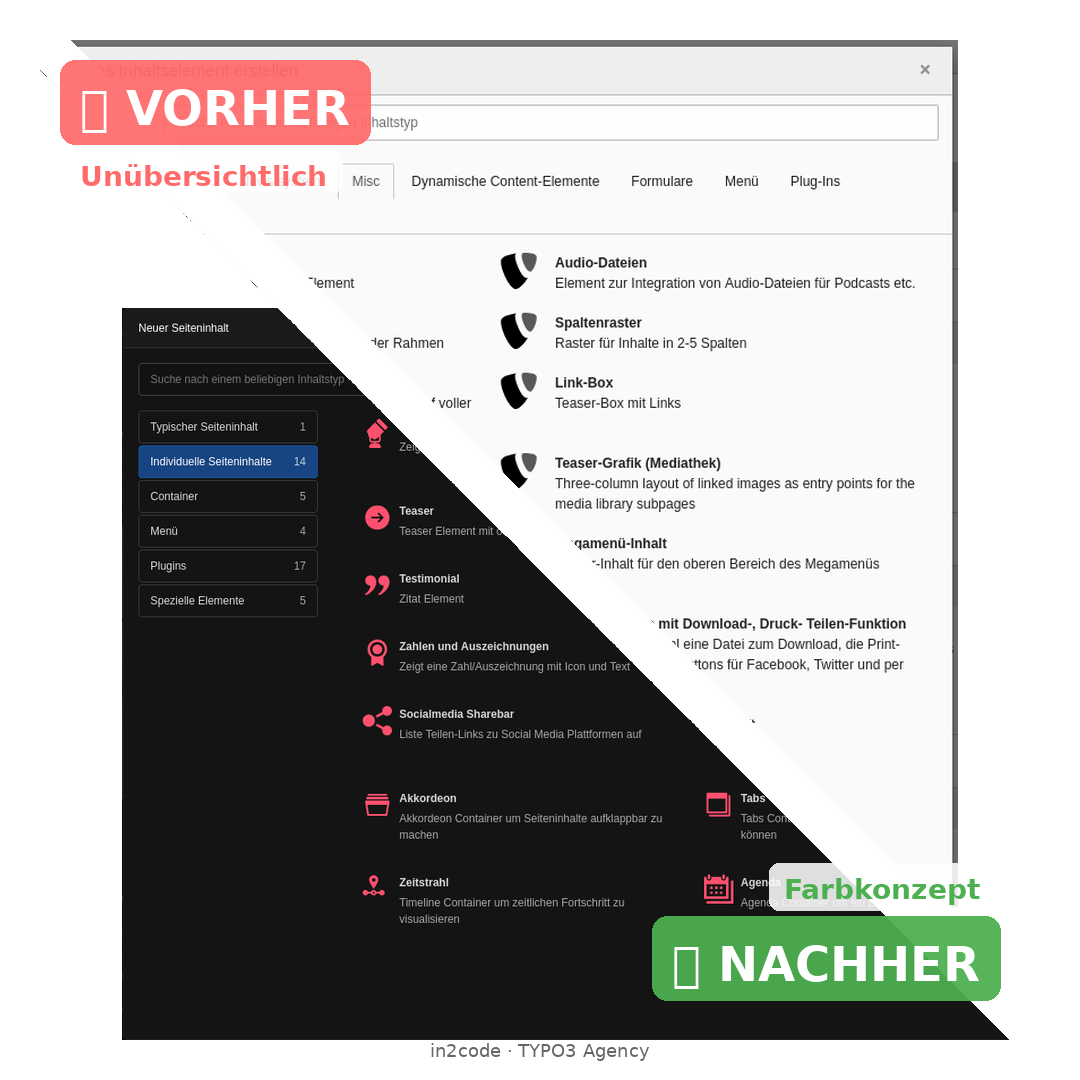
1. Consistent color scheme for all content elements
Each content element and plugin gets its own color. Stage elements in pink, teasers in turquoise, text elements in purple. It's no coincidence that these colors also reflect the client's branding. One glance is all it takes – editors immediately know what they're working with. The Content Element Wizard transforms from a monotonous gray mess into a clear, color-coded selection.
This means, for example, that when creating new content, an editor immediately recognizes which element they need. Navigation is intuitive, and the learning curve is shallow.
2. Reduction of unnecessary fields
From 60+ fields to 8-10 relevant ones. Even administrators only see what actually functions. Unused legacy fields can be consistently hidden via TSConfig and TCA configuration. This means that every editor can work with focus – without being distracted by irrelevant options.
If a field should only be visible in specific contexts, this can be elegantly solved using conditional fields. The complexity is only displayed when it's actually needed.
3. Flat Hierarchies Instead of Grid Inception
No more "grids within grids within grids within grids." We specialize in building individual content elements that do exactly what's needed – without unnecessary nesting. We rely on modern, core-integrated solutions instead of complex, nested grid structures.
4. Editorial Configuration Instead of TypoScript
Header menu, footer menu, logos, social media icons – all part of the page layout, yet still editable by editors. Site sets and backend forms give content teams full control over fundamental layout elements. No developer is needed for "Could you change the logo?" – editors are autonomous.
5. Custom Plugins Instead of HTML Content Elements
Newsletter signup? One element. Embed an iFrame? One element. Matomo opt-out? One element. Cookie banner? One element.
No more HTML content elements, no more copy-paste frenzies, no more "Where did I put that code snippet?" Everything is simple, self-explanatory functionality that editors can integrate with a single click.
Note: These optimizations also work with staticfilecache enabled. Performance and usability are not mutually exclusive.
Tip: Start with small improvements. Even hiding unused fields can noticeably increase your editors' satisfaction!
Conclusion: Backend UX is not a nice-to-have.
Backend UX is a critical success factor for TYPO3 projects. Those who cut corners here will pay the price in the long run – through higher support costs, frustrated editors, and inefficient workflows.
The good news: TYPO3 offers all the technical capabilities for excellent backend UX. You just have to use them consistently.

![[Translate to English:]](/fileadmin/_processed_/c/b/csm_seo-search-engine-optimization-2025-06-05-13-10-44-utc_208cc50996.jpg "[Translate to English:]")